
For railway, road and canal survey work
Cross sections, L‑sections and quantities, straight from the level book.
CADSECTION reads your level books, Excel sheets and .ESP project files, applies your templates and prints the sheets your office submits. Use it inside AutoCAD, or on its own as CADSECTION Studio – no AutoCAD needed.
- No card needed
- Windows 10 and 11
- 64-bit and 32-bit editions
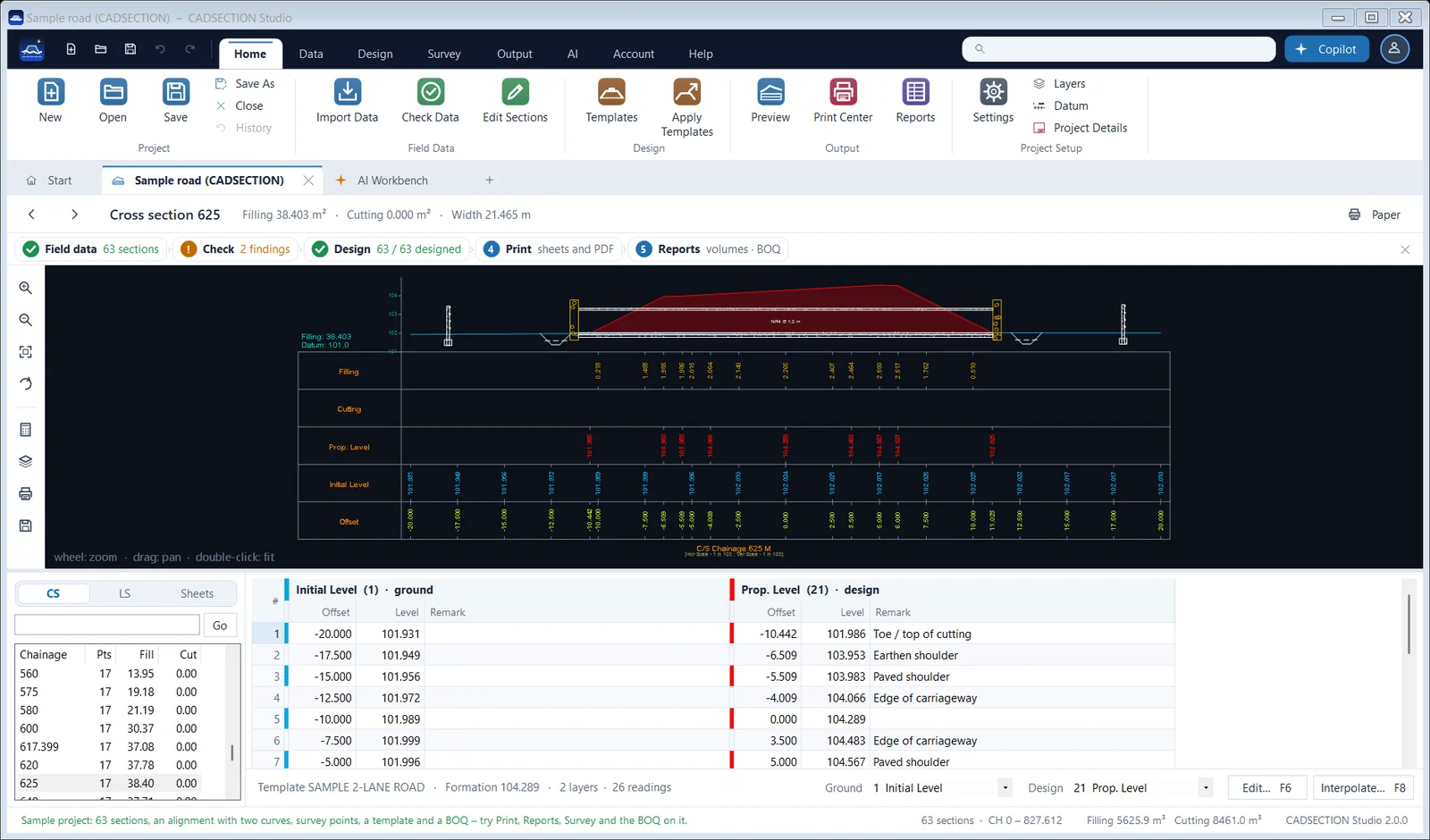
A cross section, as CADSECTION draws it
GroundDesignFilling
Works with the files and instruments you already use
- .ESP project files
- Excel level books
- Total-station and GPS points
- Photos of handwritten level books
- LandXML 1.2
- AutoCAD 2025 or newer
How it works
From field data to the bill of quantities
- 01
Field data
Open .ESP project files and Excel level books as they are, put total-station or GPS points on the alignment, or let the AI read a photo of a handwritten level book row by row.
- 02
Check
Check Data lists what needs a second look: a section with one reading, swapped offsets, a level that jumps, a chainage out of order – each with a link to the section.
- 03
Design
Templates and multi-layer assemblies for roads, railway formations and canals; formation from levels or a vertical alignment; superelevation, cant and widening.
- 04
Drawings
Cross sections on sheets with your title block and band rows, the L-section with the plan above it. PDF, DXF, DWG or the printer; Hindi and Bengali print correctly.
- 05
Quantities
Areas and volumes by the trapezoidal or Simpson's rule, corrected on curves; mass haul, setting-out reports and a BOQ in Excel with live formulas.
Features
Everything a cross-section job needs
Templates and assemblies
Carriageway, shoulders, side slopes to the ground, berms, drains, multi-layer crusts and railway formations, applied by chainage range.
Curves
Superelevation e = V²/225R and IRC extra widening for roads; equilibrium cant and formation widening for railways, run in along the transitions.
Widening and strengthening
Overlay with profile correction, milling where the old road is high, full crust on the widening with box cutting – volumes and BOQ items.
Canal design
Bed width, depth, velocity and free board per reach by Manning's formula or Lacey's regime theory (IS 10430 / IS 7112), then the lining quantity.
Print Center
Check every sheet before printing; PDF (one per sheet or all in one), DXF, DWG or the printer, with an index of the drawings as the first sheet.
Quantities and mass haul
Several area combinations at once, shrinkage on filling, free haul and overhaul, turfing and benching, an abstract of quantities.
Survey and surfaces
Survey points and TIN surfaces, contours with labels, spot levels, cut and fill maps, sections cut from a surface at any interval.
Exchange
LandXML in and out for Civil 3D, OpenRoads and 12d; DXF checked in AutoCAD; settings files to share your band rows and title block.
See it at work
Real sheets, from the sample project
AI Copilot
Tell it what to change, in plain words
You type
“Fit every section to 12.5 m and use Simpson's rule.”
Set the width of every section to 12.5 m
Change the volume method to Simpson's rule
Recompute the areas and volumes
The Copilot uses AI credits. Pro and Pro Max include credits every year; credit packs can be added to any plan.
Two ways to run it
On its own, or inside AutoCAD
CADSECTION Studio
A normal Windows program with a ribbon like AutoCAD's – no AutoCAD licence needed. Every plan includes it.
Windows 10 or 11 · 64-bit and 32-bit editions
The AutoCAD plug-in
Adds the same tools to AutoCAD and draws straight into your drawing. Included in Pro and Pro Max, and in the trial.
AutoCAD 2025 or newer
Plans
Simple prices, in rupees
Standard
₹5,999/ year
CADSECTION Studio with every drawing, design and quantity tool. AI credits can be bought when needed.
See StandardPro Max
₹17,999/ year
Everything in Pro, more AI credits, Deep mode, your own AI key – and AI apps like Claude Desktop and ChatGPT.
See Pro MaxStandard Lifetime
₹39,999once₹89,985
Pay once for 15 years of Standard, 55% less than paying every year. Lifetime means 15 years from the day you buy.
See the Lifetime offerEach licence is for one PC. Government offices, Railways and firms with several seats: ask for a quote.
Can I use my existing .ESP project files?
Do I need AutoCAD?
What does the free trial include?
What does Lifetime mean?
Can I move my licence to a new PC?
Does my survey data go to your server?
Try it on your own level book
14 days with every feature, no card needed. Drawings made in the trial carry a TRIAL mark; AI credits can be bought separately.